In Advanced Settings, on the Security tab, we have some adjustments regarding login and password security:
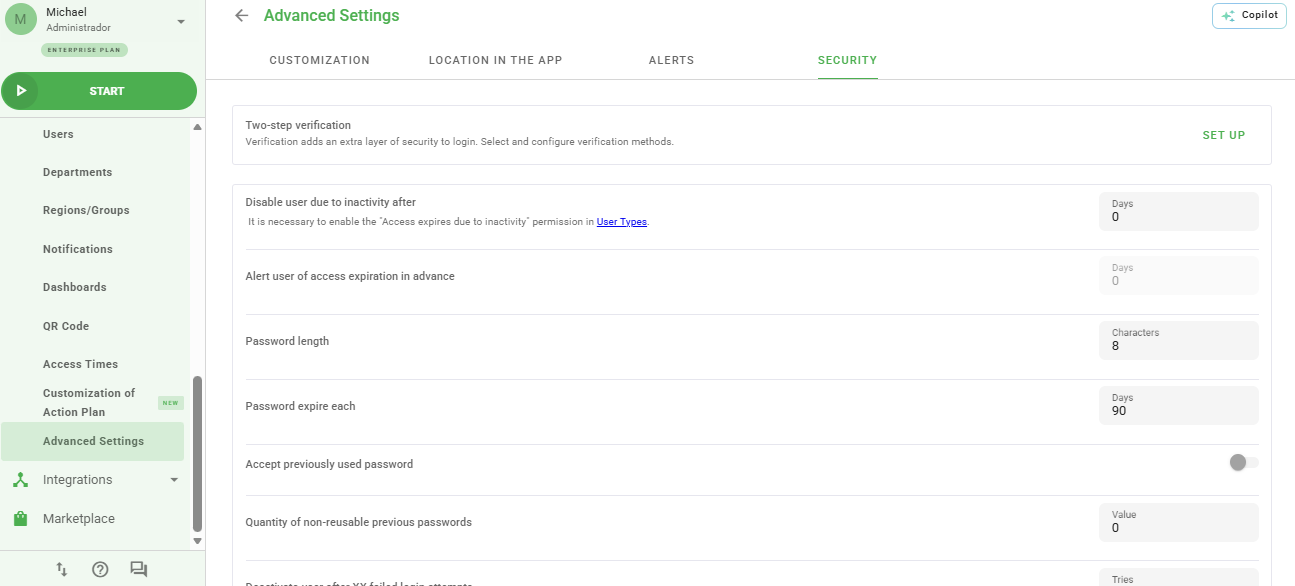
Security Settings
Below, we will explain a bit more about each feature:
* Deactivate user due to inactivity after: if a user does not access the system after the configured number of days, their access will be deactivated;
When configured with the value 0, the option will be disabled.
* Alert user of access expiration in advance of: you can define how many days in advance the system will alert the user before they are deactivated;
* Password size: Minimum password size that must be configured for access;
* Expire password every: Period in which user passwords will expire, requiring the registration of a new password;
* Accept previously used password: when enabled, the system will allow the user's password to be changed to a password that has been previously used by them.
Access and Login Features
* Number of non-reusable previous passwords: this option is related to the previous item. In it, you can define how many previously used passwords will not be accepted for use in the system.
For the Value field to be changed, you must enable the option Accept previously used password. When configured with the value 0, the entire user password history will be considered.
* Deactivate user when login fails after: How many attempts the user can make to log in. If the number of attempts is greater than configured, the user will be deactivated;
* Block multiple sessions per user: The user may not have more than one simultaneous access on the platform;
* Session time: You can define a maximum time (in minutes) that the user can access the tool per session. After the session expires, a new login will be required.
After defining your adjustments, click Save at the bottom of the page.
Frequently Asked Questions (FAQ)
1. What happens when a user is deactivated due to inactivity?
The user loses access to the system and an administrator will need to manually reactivate their account in the user settings.
2. Can I define different session times for each user?
No, the security configuration in Advanced Settings is global and applies to all users in the environment.
❓Tem dúvidas? Entre em contato com nosso time de suporte.