In configure Access Times, we can view all access time groups created in the system.
In the search field, you can filter the name of a group by typing the desired term and pressing the Enter key.
How to view access times
The main configuration screen allows for centralized management of all access periods defined for users.
Edit, deactivate or delete a group
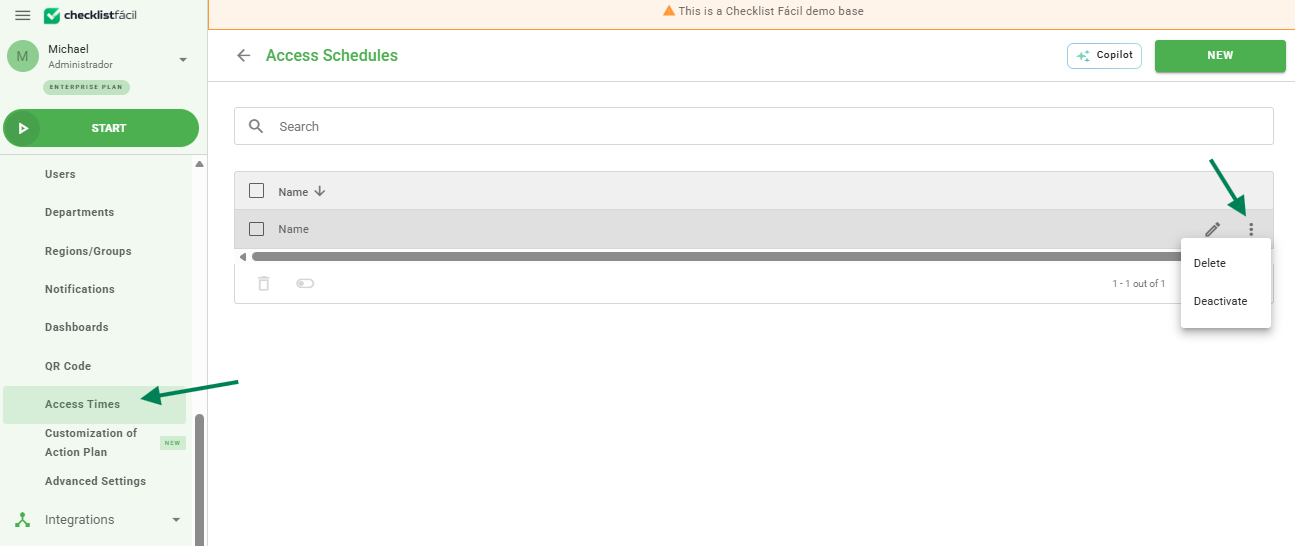
To edit an access time group, hover the mouse over the desired group. In the right corner, the edit icon (pencil) will be displayed. By clicking on it, you will be directed to the editing screen.
To deactivate or delete a group, hover the mouse over the record and click on the three side dots to view these options.
Frequently Asked Questions (FAQ)
1. What happens when a group is deactivated?
When a group is deactivated, the linked times are no longer applied, but the information remains in the system history.
❓Tem dúvidas? Entre em contato com nosso time de suporte.