- What is Access Hours
- How to create a new group
- Configure rules and periods
- Link user types
- Frequently Asked Questions (FAQ)
What is Access Hours
Using the Access Hours functionality, it is possible to configure and limit user access to the system based on specific days and times. This is an excellent way to ensure security and compliance with work shifts.
This configuration prevents the user from logging in or synchronizing data outside the permitted period.
How to create a new group
To start creating a new time group, navigate through the side menu to: Settings > Access hours. Then, in the upper corner of the screen, click the New button.
Configure rules and periods
In this step, you must provide an identification name for the group and define which days of the week the rule will be applied, specifying the start and end interval for each selected day:
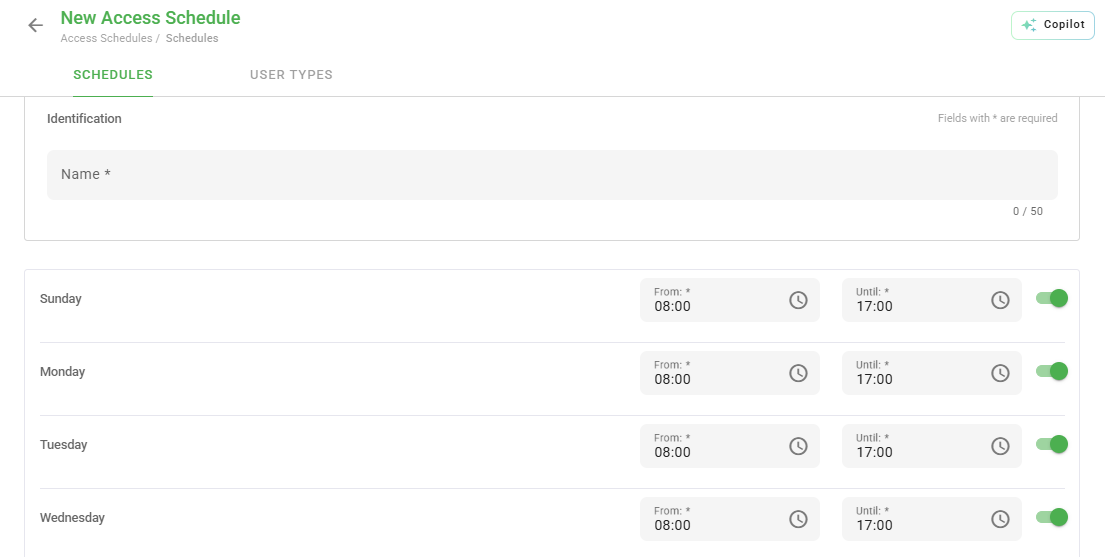
When you finish defining the times, click the Save button located at the end of the page to proceed.
Link user types
After saving the rules, you will be directed to the User types tab. On this screen, it is necessary to select which user categories will be subject to the restriction you just created:
Remember to click Save again after selecting the user types for the restriction to take effect.
Frequently Asked Questions (FAQ)
1. What happens if the user tries to access outside the scheduled time?
The system will display a message stating that access is not permitted at that time and will prevent entry or data synchronization.
2. Can I apply different times for Saturdays and Sundays?
Yes, you can enable only the desired days and configure distinct intervals for each of them within the same group.
❓Tem dúvidas? Entre em contato com nosso time de suporte.