To streamline the management of action plans, Checklist Fácil allows you to approve or disapprove pending solutions in bulk. This functionality is ideal for optimizing the time of managers who handle a large volume of simultaneous demands.
Bulk Approval of Solutions
The option is available on the Action Plans screen, through the tools menu. With just a few clicks, you can process multiple requests at once.
This function is located at: Tools Menu > Approve/Disapprove solutions.
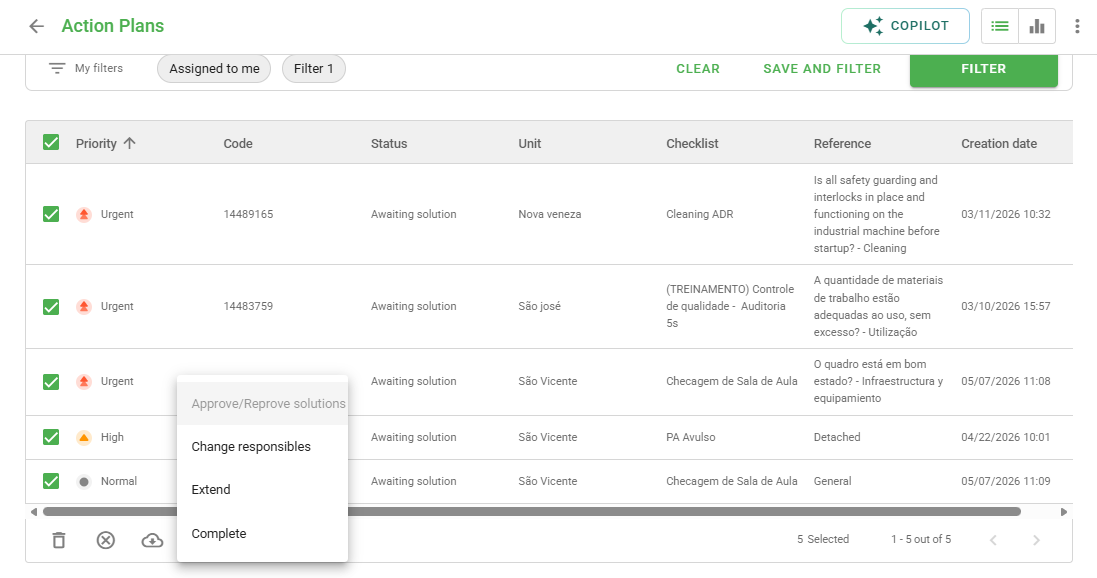
How to use the tool
Just like other bulk action tools, the system performs an automatic validation. If you select action plans that cannot be changed (because they are in an incompatible status, for example), the system will issue a notification:
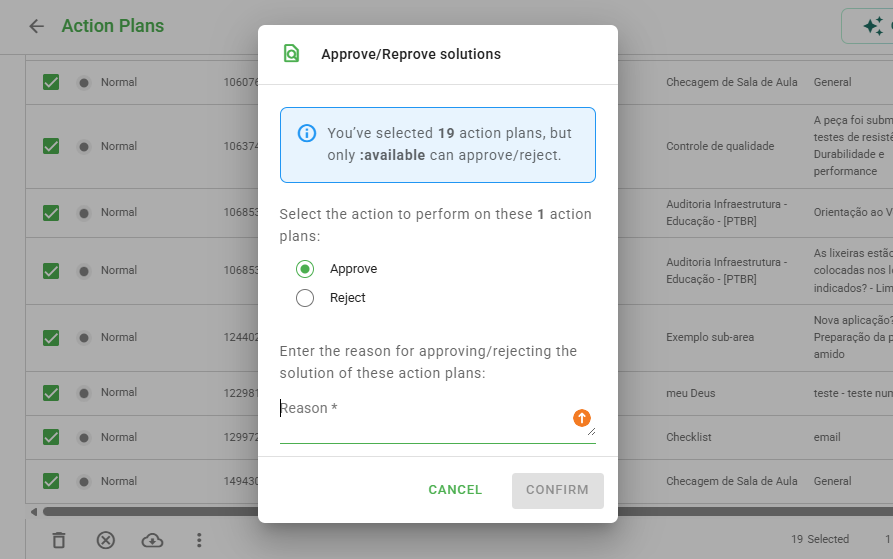
After confirming the desired action, the request will be processed in the background and sent to the Import/Export History. There, you can monitor the progress and verify the completion of the process.
Use the filters on the Action Plans screen to select exactly the solutions you want to approve before opening the tools menu.
Frequently Asked Questions (FAQ)
1. Where can I track the progress of the approval?
The progress can be viewed on the system's Import/Export History screen.
2. Can I revert a bulk approval?
Once confirmed and processed, the status change is recorded in the history of the action plan. If you need to change it again, you will need to make the adjustment individually or perform a new bulk action if the requirements are met.
❓Tem dúvidas? Entre em contato com nosso time de suporte.