- What is Supplier Evaluation
- Required Configuration
- How to apply in practice
- Frequently Asked Questions (FAQ)
What is Supplier Evaluation
This module allows evaluating suppliers after the delivery of materials for each order at the construction site. The supplier evaluation checklist is the same one used for order checking; however, specific questions about the supplier are organized in a separate area.
During the inspection in the application, the person in charge fills in numerical fields (without validation) based on criteria such as reliability, honesty, and product quality. The range (score range) will be available in the item hint.
Where to view the scores?
Access to scores in Sienge is done through the path: Supplies > Support > Suppliers > Supplier Evaluations. The last 3 scores for each supplier will be available.
Required Configuration
To use this functionality integrated with Sienge, follow the configuration steps below.
To use the integration, the creation and configuration of a user on the Sienge Platform is mandatory. If you have not done this, please consult the article on first steps for integration configuration.
1. Default unit type for construction site
Upon integrating, Sienge construction sites are listed in the "Construction Sites" tab of Checklist Fácil. In order for them to be correctly imported as inspection units in Contracts or Orders, you must determine a default unit type. Make sure that the "Unit Type" module is enabled in your account.
2. Enable supplier evaluation
By activating the option "Uses supplier evaluation of purchase orders", the system will automatically add an evaluation area to the order inspection checklists, following the criteria defined in Sienge.
Important: The new evaluation area only appears in new checklists created after activation. To update old checklists, disable the construction site in the orders module and activate it again. This will force the update of pending orders.
How to apply in practice
After configuration, the application can be done via Web or App (online and offline). The workflow for the inspector is:
1. Access Apply;
2. Select Apply purchase order inspection;
3. Choose the Construction Site and the corresponding inspection form;
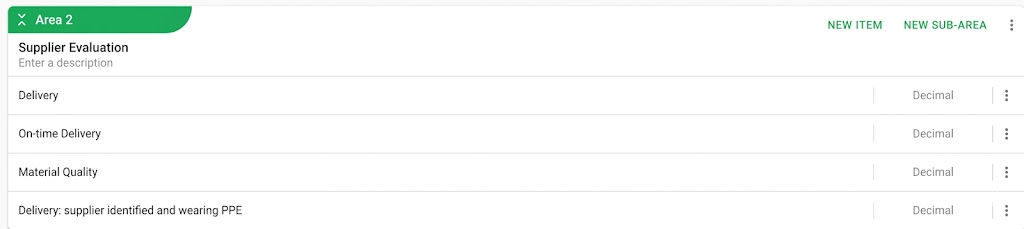
4. Perform the application and fill out the Evaluate order supplier area.
The evaluation area is separated from the others and will contain the criteria configured in Sienge with the option "Default criterion for order evaluation". See the example below:
Frequently Asked Questions (FAQ)
1. Can I change the evaluation criteria in Checklist Fácil?
No. The maximum scores and criteria are configured exclusively in Sienge. The checklist generated via integration does not allow manual changes to the structure of these items.
2. Why do some Sienge criteria not appear in the app?
Only the criteria marked in Sienge with the option "Default criterion for order evaluation" are imported into Checklist Fácil. Please verify this configuration in your Sienge platform.
3. How do I update checklists already created to include this evaluation?
To update checklists already imported, disable the construction site for the orders module and then activate it again. This process will analyze all pending orders in Sienge and update the forms.
❓Tem dúvidas? Entre em contato com nosso time de suporte.