In addition to exporting via the web system, you can also generate the PDF report of your inspection directly through the Checklist Fácil app. This option becomes available immediately after the conclusion and synchronization of data.
Attention: This feature is part of an additional module. If you cannot find the option, please check availability with your Account Manager (CS) or with the Solution Team.
How to generate the PDF in the app
After completing the filling and synchronizing the checklist, follow the steps below:
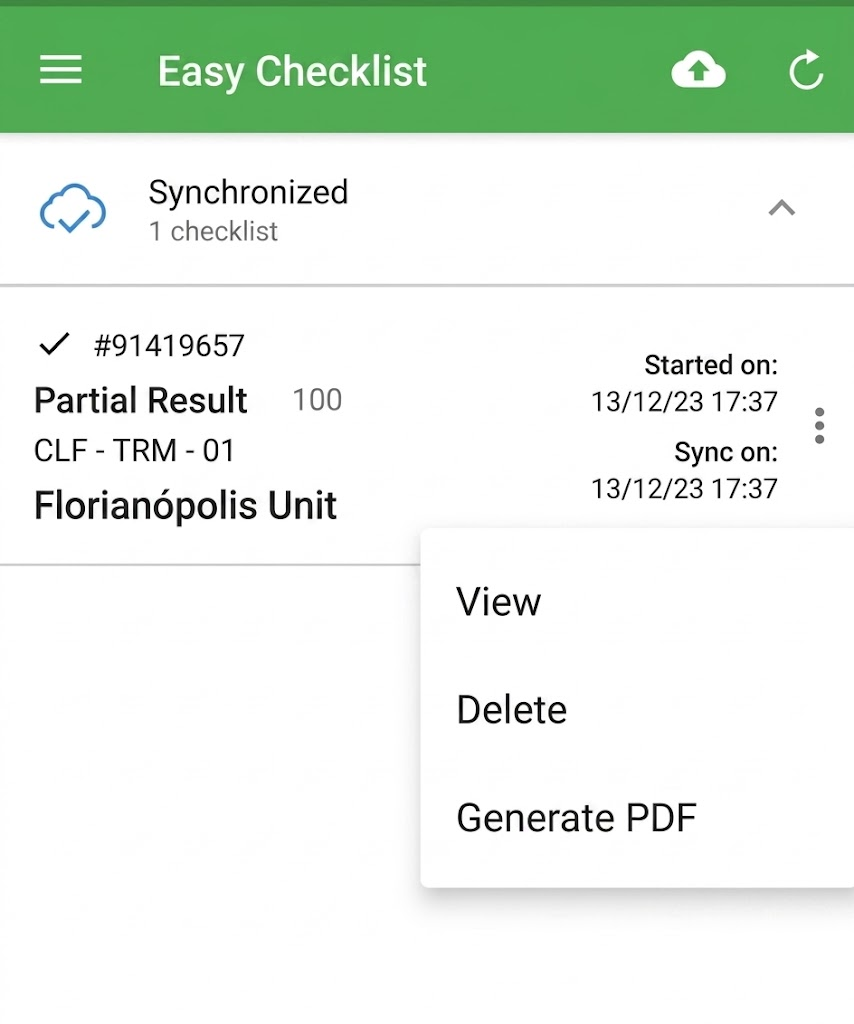
1. In the bottom menu of the app, access the Concluded tab;
2. Locate the desired checklist in the list;
3. Tap the menu icon (three dots) next to the checklist;
4. Select the option Generate PDF.
Download and share the file
As soon as the file is generated, you will have the freedom to save it or send it to other people:
Download: Save the PDF to your device's internal storage to access it offline whenever you need.
Share: When selecting this option, your phone or tablet's default menu will open. From there, you can send the document directly via WhatsApp, Email, Telegram, or other installed apps.
Frequently Asked Questions (FAQ)
1. I cannot find the "Generate PDF" option, what should I do?
This function is an additional module. If the option does not appear in the concluded checklist menu, please contact the system administrator in your company or our support team to verify the contracting.
2. Can I generate the PDF of an unsynchronized checklist?
No. To ensure that all information and photos are correct in the report, it is necessary to synchronize the checklist before generating the file.
❓Tem dúvidas? Entre em contato com nosso time de suporte.