This article will give you instructions about how to explore the available status for an Action Plan and give you more details about them.
In the first filter option is Status, in the Action Plans screen, there are all the Action Plans status options to do look for the one you want:
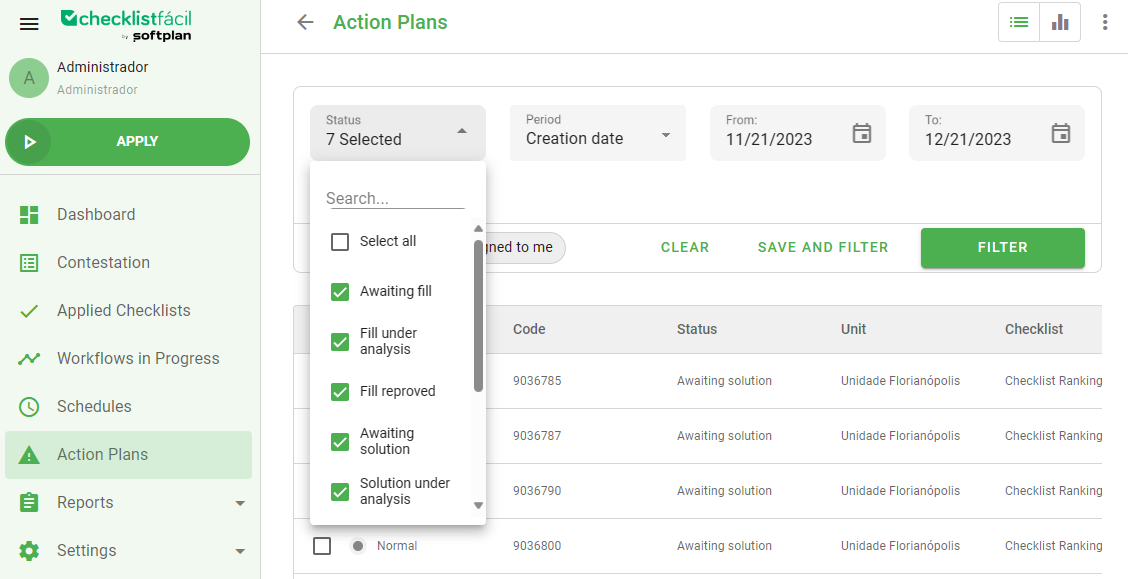
At the moment, the status are:
Awaiting fill: Action plans waiting to be filled by the user responsible for it;
Fill under analysis: After filled, the type of user that has permission can approve or reprove the fill;
Fill reproved: When the user responsible for this plan reproves the fill;
Canceled: When the Action Plan is approved and the responsible decides that is not necessary to do the action anymore;
Awaiting solution: The way all the Action Plans start.
Solution under analysis: When the Action Plan is registered and approved, the solution registered needs to be analyzed;
Concluded: When the Action plan is already finished;
Awaiting conclusion: When the solution was already registered and approved by the responsible user, but it still needs to be concluded;
Solution reproved: When the Action Plan solution was already sent to be analyzed and was reproved by the responsible user.
Was this article useful? Remember to rate it!
Got questions? Contact us through chat or ticket!
❓Tem dúvidas? Entre em contato com nosso time de suporte.