The first thing you need to authenticate in the Checklist Fácil APIs is your API key. If you don’t have it, follow the steps to create one here.
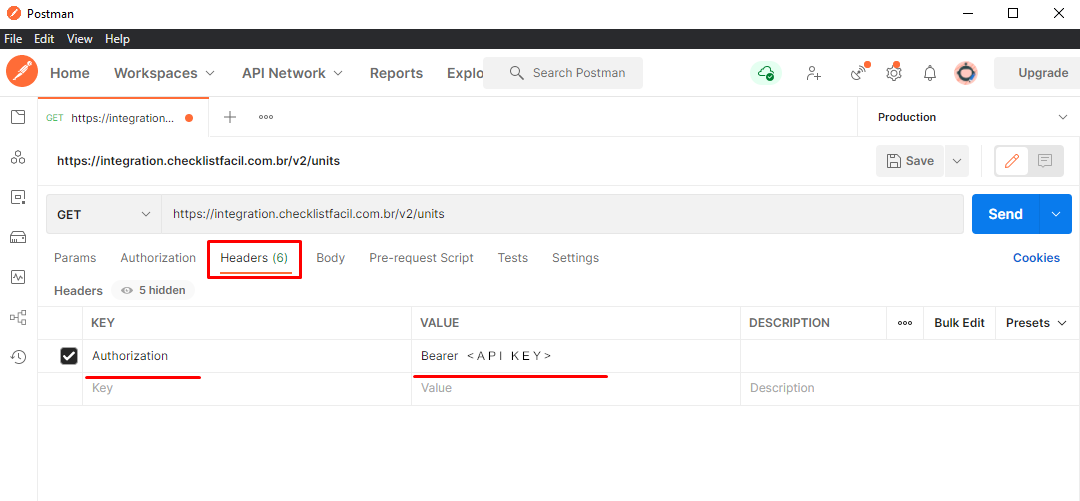
Authentication is performed using the Authorization header in requests, as mentioned in the documentation.
In these exemples, you have to change the text <API_KEY> to your key.
Using a cURL simple call, you have to fill the header according to the example:
curl -H "Authorization: Bearer <CHAVE_DE_API>" https://integration.checklistfacil.com.br/v2/units
When doing the same request using Postman, you can set up the header manually:
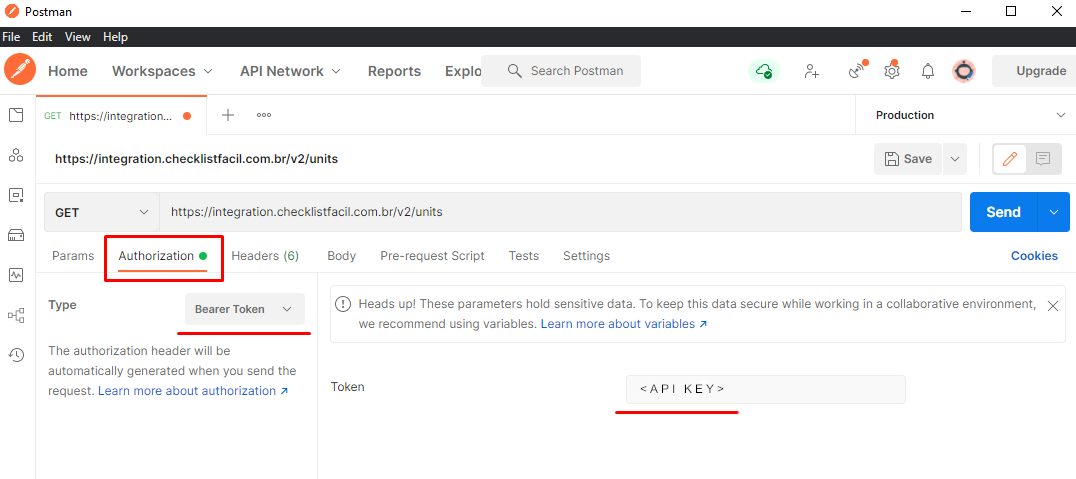
Or you can set up a request to authenticate using the Bearer Token method, the one our APIs use to authenticate. To do that, you must go to the authorization tab and inform your API key.
Was this article useful? Remember to rate it!
Got questions? Contact us through chat or ticket!
❓Tem dúvidas? Entre em contato com nosso time de suporte.