- What is the Pivot filter?
- First query and storage
- How incremental update works
- Practical example in Postman
What is the Pivot filter?
The pivot filter of the Analytics API was created to facilitate the process of populating a database, data warehouse, or data lake incrementally. In other words, with it, we can fetch only the differences relative to a specific date.
First query and storage
To understand how it works, imagine the following scenario: you are querying information to save in a location within your organization and you have 10,000 records of unit registrations.
Initially, you will perform a complete first query, without filters, for the units resource:
Access the route documentation here
In this process, you will go through all pages (e.g., 10 pages of 1,000 records each), saving this data in your local database.
→ Important: You must save the exact date and time you performed this first query. It will be your future reference.
How incremental update works
When you need to update your information, it will not be necessary to query all units again. By using the pivot filter, the API will return only the differences that occurred after the date of your initial query.
This difference basically considers three factors:
- New registered records;
- Records that have been updated;
- Removed records (which have a date filled in deletedAt).
→ Tip: Use the pivot[gte] parameter. This way, you request everything that has changed since that date, applying an efficient incremental update.
Practical example in Postman
Assuming your first request was made on 05/05/2022 at 10:30:00 (Timezone America/Sao_paulo), your request will look similar to the image below:
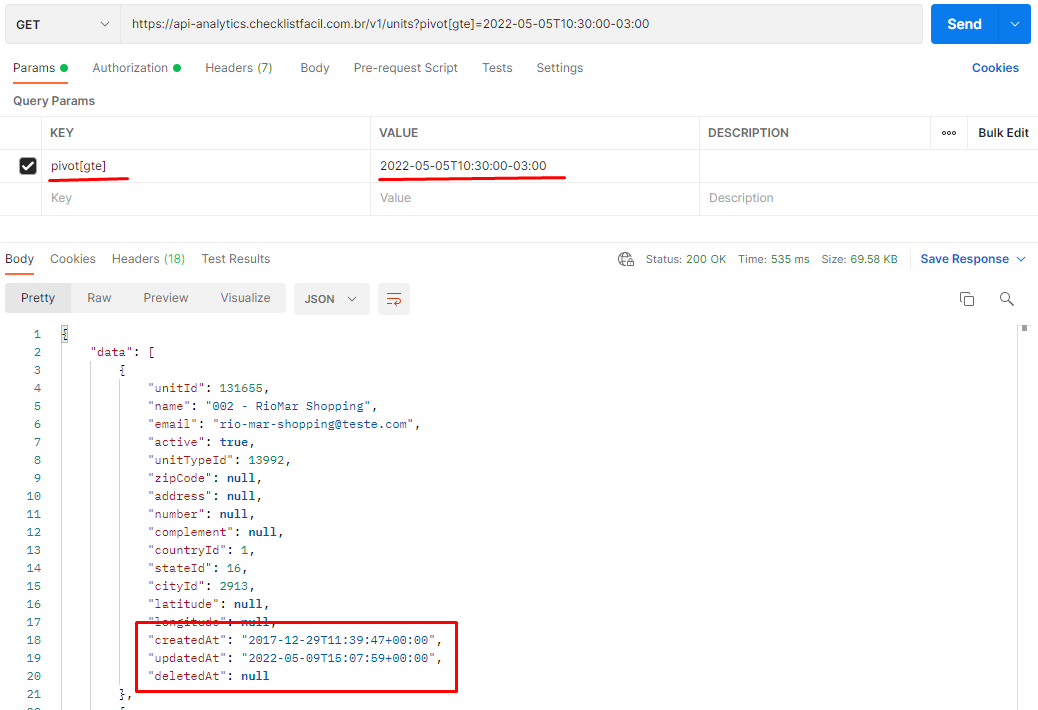
Note in the example above that the first item returned is a unit originally registered in 2017, but it appears in this list because it had an update on 05/09/2022 (a date later than our pivot).
Frequently Asked Questions (FAQ)
1. Does the pivot filter return only new data?
No. The filter returns any record that has undergone changes since the informed date. This includes new registrations, edits to old registrations, and deletions (marked with deletedAt).
2. Which parameter should I use for the date?
We recommend using the pivot[gte] parameter (greater than or equal) to ensure that you capture all changes since the moment of the last synchronization.
❓Tem dúvidas? Entre em contato com nosso time de suporte.