- Feature Objective
- How to configure a catalog dependency
- Automatically select all records
- Behavior Rules
- Grades and Score Calculation
- Frequently Asked Questions (FAQ)
Dependencies allow the creation of dynamic and intelligent checklists, making the application cleaner and faster. Now, in addition to evaluative items and selection lists, you can also configure dependencies using catalog-type items.
This feature is ideal for complex operations that use extensive catalogs, preventing data duplication and reducing checklist completion time.
Feature Objective
Allow selected records in a catalog item to display or hide other items, areas, and subareas during application. This behavior is equivalent to the existing one in the selection list scale.
How to configure a catalog dependency
1. Access the checklist editing screen and select the catalog-type item that will be the "Parent" (trigger).
2. Within the item settings, locate the Dependencies section, which will be displayed right after the Display section.
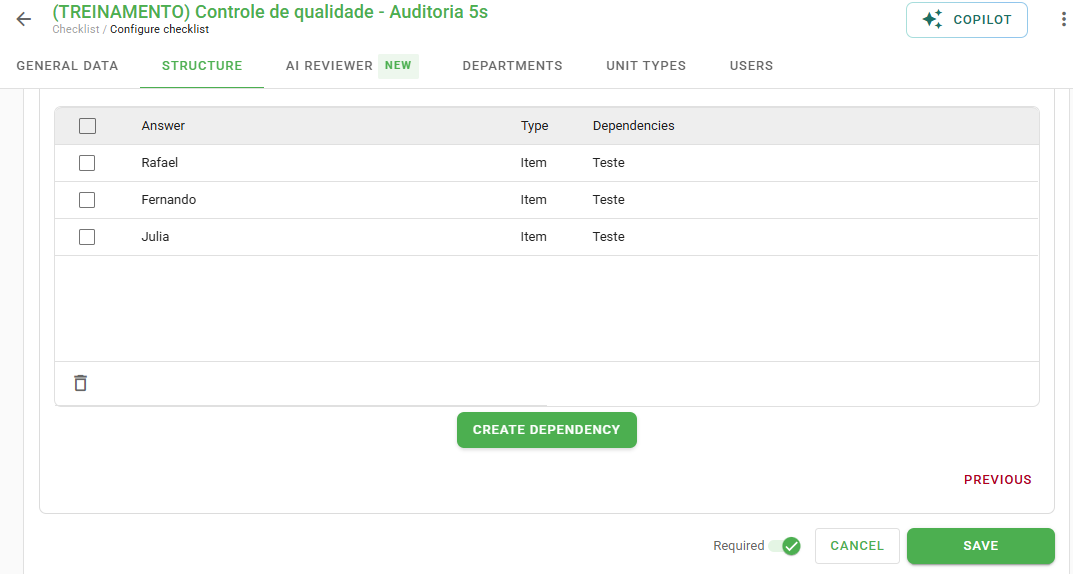
3. In the Response field, select one or more catalog records that should activate the rule. You can filter by name or barcode.
4. In the Type field, define whether the dependency will release an Item, an Area, or a Subarea.
5. Select the dependent item ("Child") from the list and click Add.
For more details on the rules and practical examples, check out our article: How to create decision trees with Dependencies?.
Automatically select all records
An important incremental feature is the option "Automatically check new options from the list".
By checking this option, any current or future record added to your catalog will automatically trigger the configured dependency.
Behavior Rules
To ensure checklist integrity, the system follows a few hierarchical rules:
• No going back: An item can never unlock something that is positioned before it in the structure.
• Single parent: A child item can only depend on a single previous question.
• Same scope: To unlock an item, it must be in the same area/subarea as the parent item.
APP Version:
To use catalog dependencies, make sure your application is updated to the following versions (or higher):

• Android: 3.70.0
• iOS: 3.26.9
Grades and Score Calculation
Rest assured regarding scoring: the grades calculation automatically ignores dependent items that were not displayed. This prevents questions irrelevant to that context from penalizing the final evaluation score.
Frequently Asked Questions (FAQ)
1. Can I use free text items to create dependencies?
No. Only items with predefined answers (Evaluative, Selection List, and now Catalog) can serve as a trigger for dependencies.
2. What happens if I duplicate a checklist with catalog dependencies?
The new copy will automatically replicate all configured dependencies, maintaining the same behavior as the original checklist.
3. Why can I not select an item from another area as a dependent?
Due to hierarchy reasons, an item can only unlock another item that is within its own area or subarea.
❓Tem dúvidas? Entre em contato com nosso time de suporte.