In Advanced Settings, under the Alerts tab, we have some adjustments regarding alerts for Action Plans and Schedules.
Alert Settings
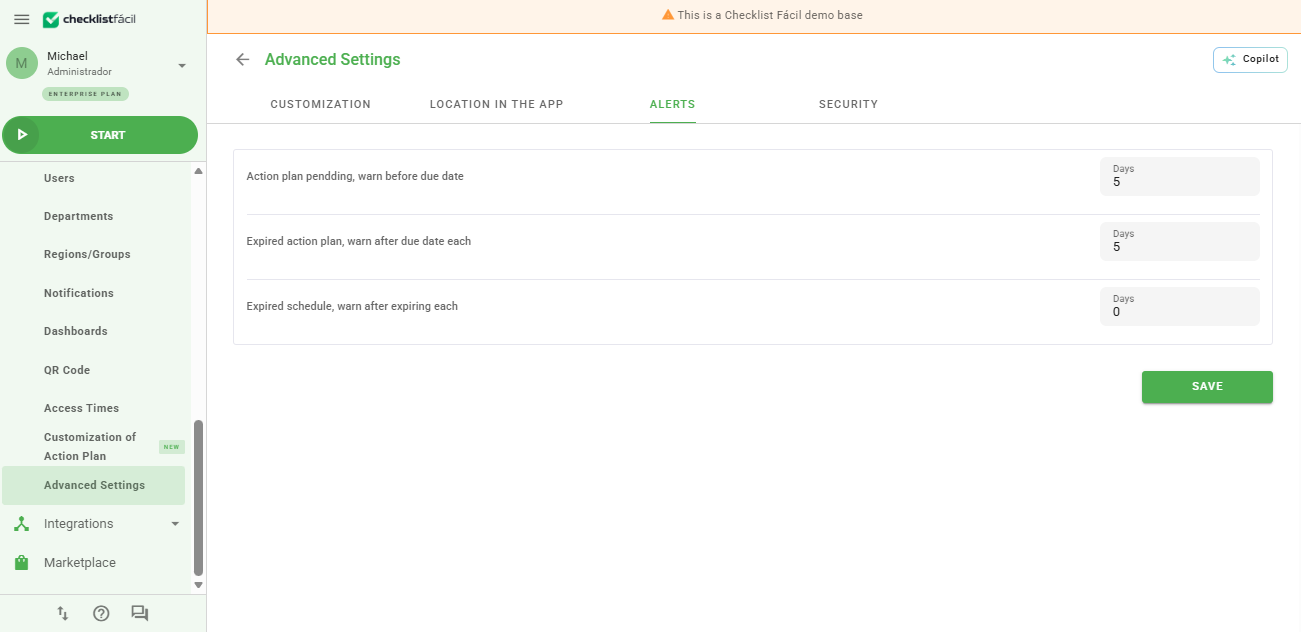
Below we will explain a little more about each feature and how they help in managing your activities.
Notification Features
Action plan not filled out, notify every: Here you can define every how many days the address registered in the AP unit will receive a package containing the action plans pending completion.
This setting helps keep the workflow updated, preventing pending items from being forgotten.
Pending action plan, notify before expiration: You can configure every how many days the address registered in the AP unit will be notified before expiration with a package of the action plans that are pending.
Overdue action plan, notify after expiration every: You can define every how many days the unit will be notified when an Action Plan is already overdue.
Remember: Recurring notifications of overdue items assist in the immediate regularization of Nonconformity.
Overdue schedule, notify after expiration every: You can configure every how many days the person in charge will be notified when a schedule is already overdue.
Frequently Asked Questions (FAQ)
1. Who receives these email alerts?
Alerts are sent to the email registered directly in the registration of the Unit linked to the Action Plan or Schedules.
2. Can I disable these alerts?
Yes. To disable them, simply leave the days field with a value of zero or blank in the advanced settings.
❓Tem dúvidas? Entre em contato com nosso time de suporte.