Massively import the options that can be used as a response to picklist-type items. The limit number of options for an item is 750, and each option can be up to 750 characters long.
When you create or edit a picklist item, you can add the options manually or use the import spreadsheet by clicking Import Options.
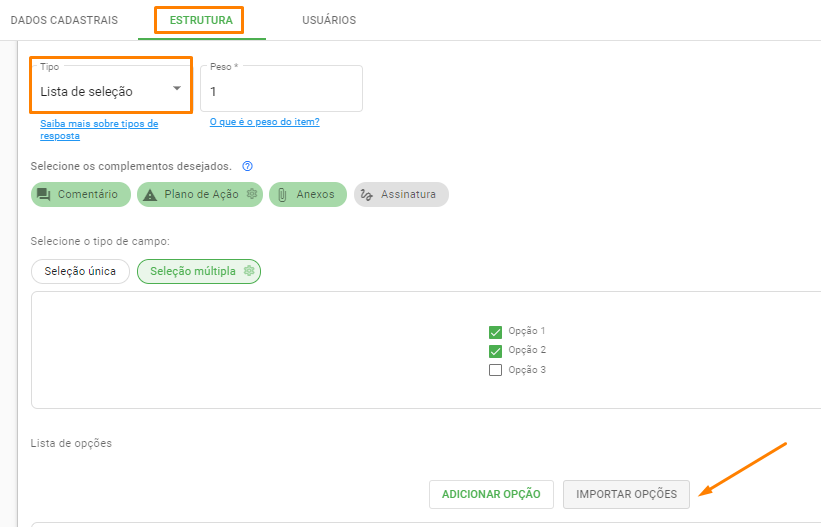
Download the spreadsheet template and fill in the fields as per the template:
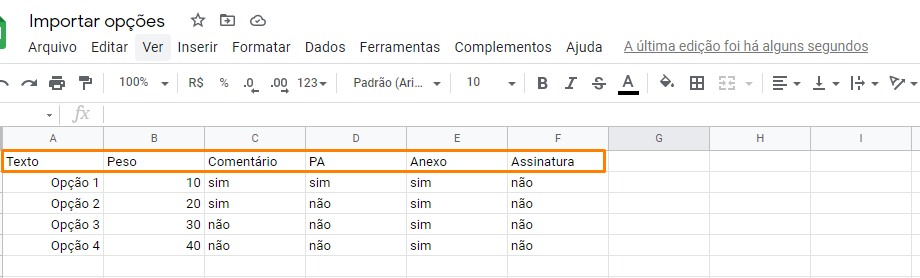
* Text: Name of the answer choice;
* Weight: What percentage this option represents according to the weight entered in the item;
* Comment/AP/Attachment/Signature: Whether add-ons will be mandatory according to option.
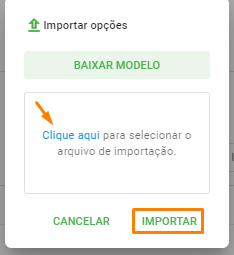
After filling it out, save the spreadsheet in CSV format. Then, again in Import Options, select the file saved on your device and click on Import, to start the import to the system.
➡️ Was this article useful? Leave your review!
❓Do you still have questions? Contact us via chat or ticket!
❓Tem dúvidas? Entre em contato com nosso time de suporte.