- Feature objective
- How automatic deactivation works
- System configuration
- Deactivation criteria
- History log
- Frequently Asked Questions (FAQ)
Avoid the accumulation of old checklists and improve application performance with the automatic deactivation feature. In this article, you will understand how to configure this option, how it works, and when it will be applied.
Feature objective
The automatic deactivation of checklists feature was developed to improve application performance, especially for clients with a high volume of data.
With it, it is possible to prevent the unnecessary download of old and unused checklists, accelerating data synchronization and updates.
How automatic deactivation works
The feature operates by automatically deactivating checklists that:
- Do not have applications started or finalized within the last X days (defined by you);
- Do not have pending schedules;
- Were created more than X days ago.
Important: Deactivation is performed by an automated service, executed daily.
System configuration
The configuration is carried out following the path below:
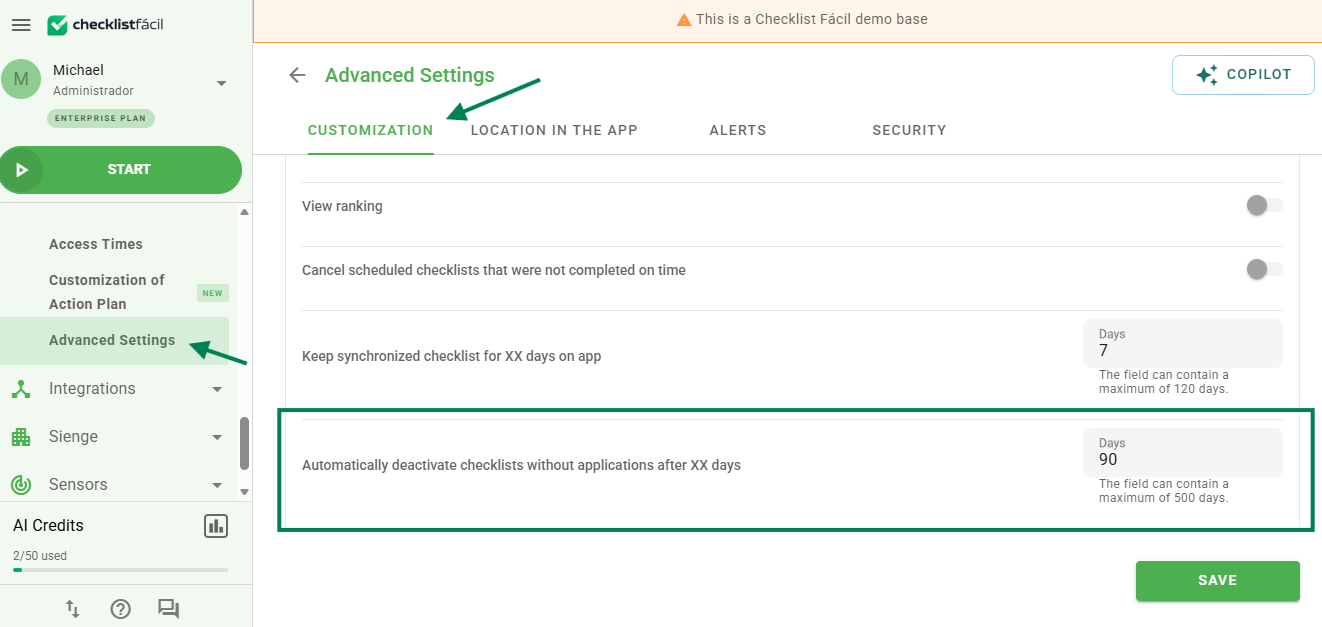
Access: Settings > Advanced Settings > Customization
Configuration name: Automatically deactivate checklists without applications after XX days
Filling rules:
- Minimum value allowed: 30 days
- Maximum value allowed: 365 days
- Default value: 90 days
If the inserted value is less than 30 or greater than 365, the system will automatically adjust it to the nearest limit.
Example of the configuration on screen:
Deactivation criteria
Deactivation will occur only if ALL the criteria below are met:
- The checklist was created more than X days ago (configured in the company).
- There are no applications started or concluded within this period.
- It does not have pending schedules (status "Not started").
Attention: The approval date is not considered. Even if a checklist has been recently approved, it will be deactivated if it does not have new applications.
History log
Every automatic deactivation will be logged in the checklist history, with the following information:
- Deactivation date
- Reason: Checklist automatically deactivated due to inactivity
- Responsible: System
History example:

Frequently Asked Questions (FAQ)
1. Does the approval date prevent the checklist from being deactivated?
No. The approval date is not considered in the criteria. Even if the checklist was recently approved, it will be deactivated if there are no new applications within the configured period.
2. What happens if I enter a value lower than 30 days in the configuration?
The system will automatically adjust the value to the minimum allowed, which is 30 days. Similarly, values above 365 will be adjusted to 365.
❓Tem dúvidas? Entre em contato com nosso time de suporte.