To modify an evaluation in an already finished report, it is first necessary to configure the system to allow the checklist to be reopened.
How to enable checklist reopening
Follow the step-by-step instructions below to enable this permission:
1. Access the menu Settings > Checklists.
2. Click to edit the desired checklist or create a new one.
3. On the Registration data tab, go to the footer of the page.
4. Expand the option Post-conclusion.
5. Check the box: Can the checklist be reopened after its conclusion?.
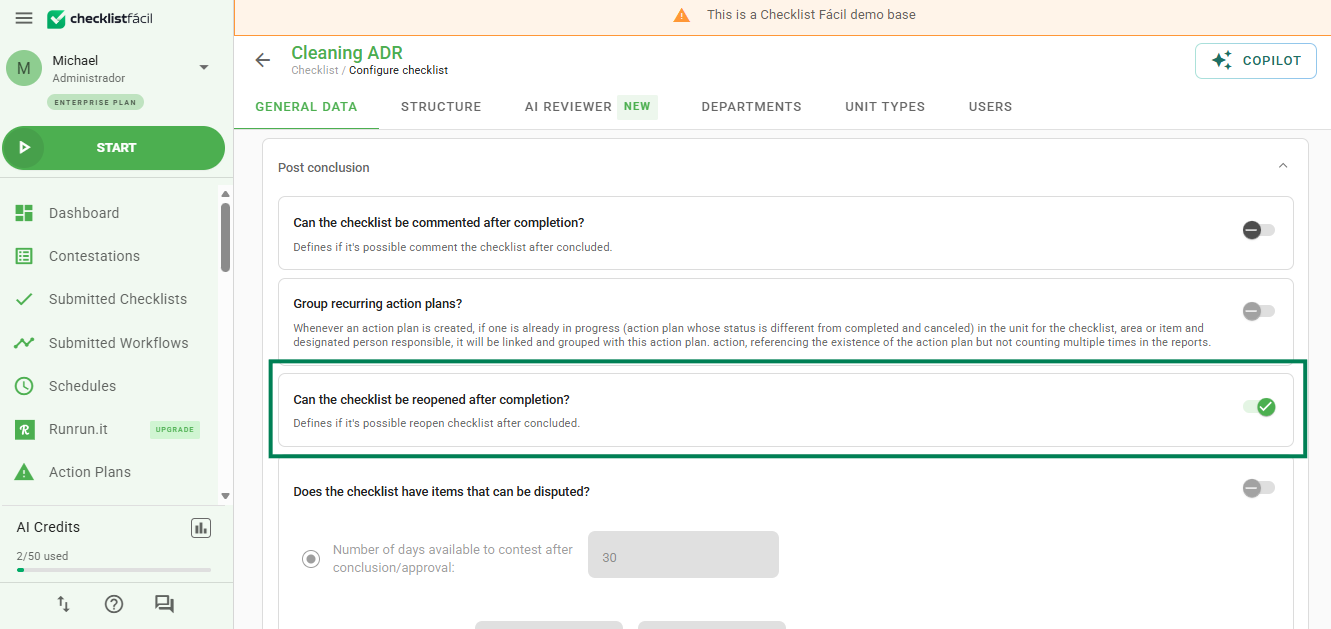
6. Click Save at the bottom of the page to confirm the change.
With this option enabled, it will be possible to edit the responses even after the application has ended.
Frequently Asked Questions (FAQ)
1. Does this change affect old reports?
Yes, the configuration applies to the checklist template. Once enabled, the reports generated from this template can be reopened, respecting the user access permissions.
❓Tem dúvidas? Entre em contato com nosso time de suporte.