This article is about a feature of an add-on module. Check availability with your Account Manager or Solution Team.
The image-type area is a different modality for the checklist area: instead of your items/questions being presented in a list, they will be points distributed in an image of your choice, to guide the applicator which points should be evaluated visually.
To set up an area with the image type, you must first create it. Navigate to Settings > Checklists > Edit > Structure. Then, Create a new area and select the Image type. After that, insert the image that will be used to guide the applicator in that area:
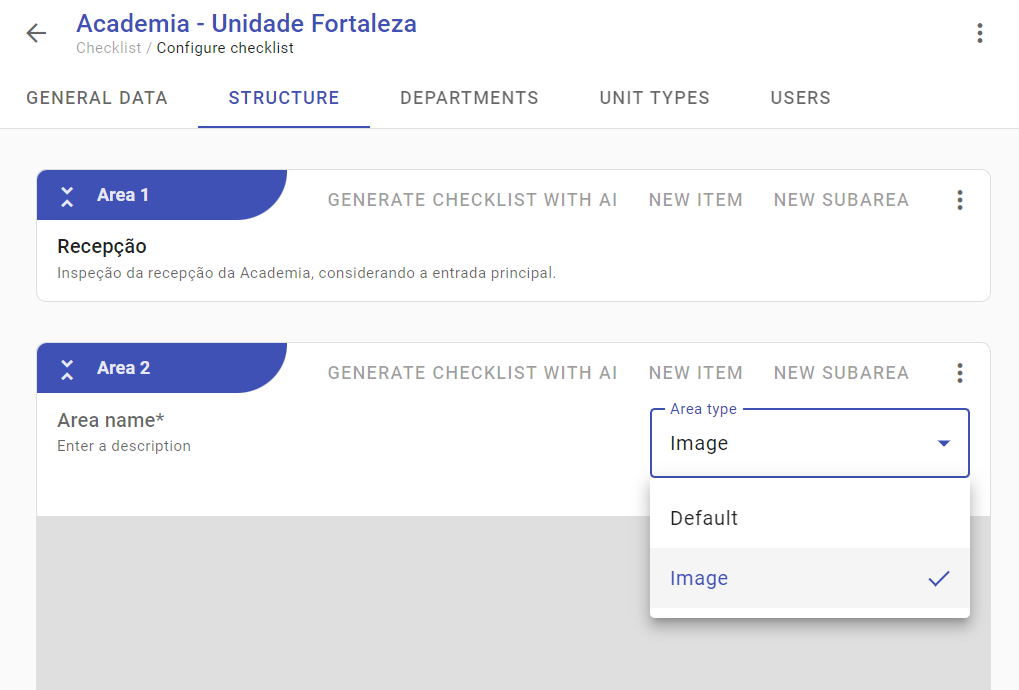
Finally, as items are created, points for each one will appear on the image. You can move and position each point in the relevant location.
During the application, simply press on the points and the corresponding item will appear to be answered.
➡️ Was this article useful? Leave your review!
❓Do you still have questions? Contact us via chat or ticket!
❓Tem dúvidas? Entre em contato com nosso time de suporte.