The AI text enhancement feature was developed to facilitate the creation and editing of items within the checklist structure, allowing users to apply improvements and corrections to descriptions in a simple and effective way.
What is it?
It is an artificial intelligence text assistant that helps in composing the description of checklist items by offering automatic suggestions based on the typed content. With this, it is possible to gain agility in configuring checklists and ensure greater standardization in writing.
How to use?
This feature is available within the checklist structure, both when creating and editing items. Follow the step-by-step instructions:
- Access the editing of the desired item or create a new one;
- Fill in the description normally;
- Click on the "Enhance text with AI" icon;
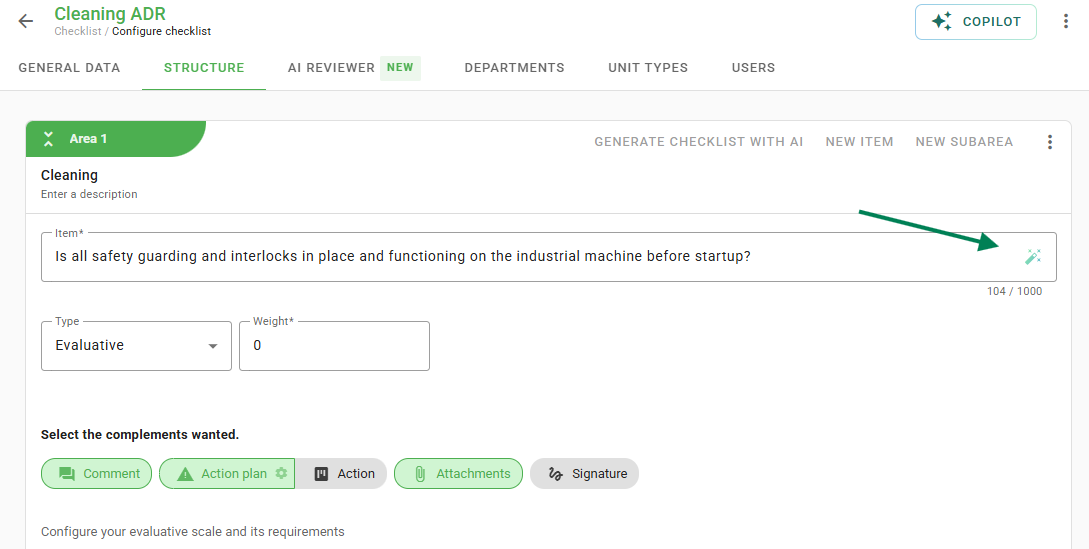
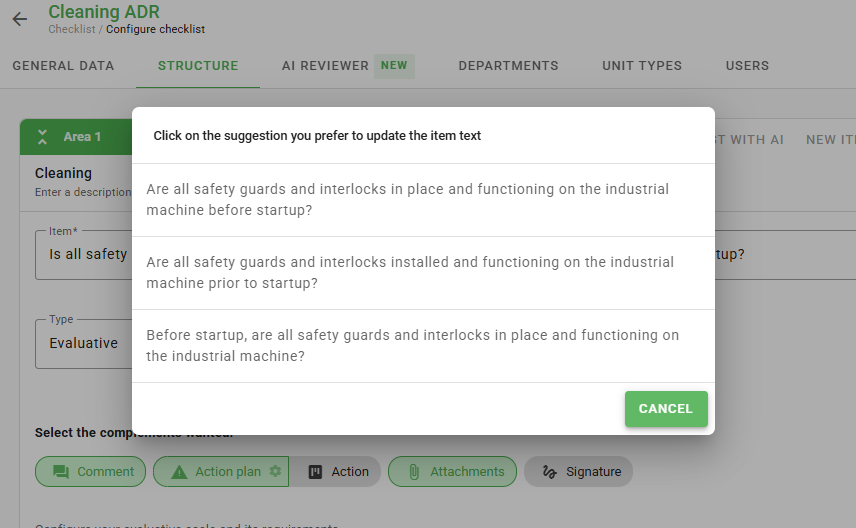
- Choose one of the presented suggestions to apply improvements to the text.
Tip: this tool is especially useful for teams seeking standardization or inspiration when writing clear and complete assessments. Use it as a starting point and customize it according to your checklist needs.
Frequently Asked Questions (FAQ)
1. Does the AI replace the text automatically?
No. The tool offers suggestions, and you must click on the desired option for the change to be applied to the description field.
❓Tem dúvidas? Entre em contato com nosso time de suporte.