- Action Plans Notification Consolidation
- How does it work in practice?
- Frequently Asked Questions (FAQ)
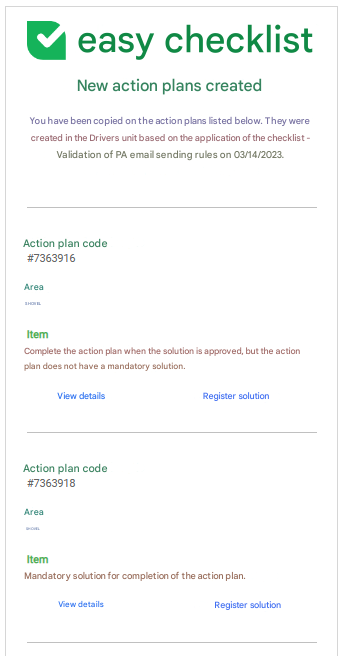
Emails regarding the creation of action plans are now consolidated. With this update, a single notification is sent for multiple action plans created in the same evaluation, optimizing your inbox.
Action Plans Notification Consolidation
Consolidation occurs based on the following criteria:
- Responsible;
- Unit;
- Emails added in the "Email notification" and/or "Send copy to:" fields.
This improvement aims to reduce the volume of messages sent, grouping pending items from the same inspection into a single informative email.
How does it work in practice?
Imagine an evaluation that generated five action plans. Two are assigned to Alberto, three to Bernardo, and all have João in copy. Instead of triggering several individual emails, the system will work as follows:
- Alberto: will receive a single email containing his two action plans;
- Bernardo: will receive a single email containing his three action plans;
- João: will receive a single email containing the five action plans from that evaluation;
- Unit: will receive a single email containing the summary of the five plans.
Even if a responsible person has different links (such as belonging to a Department and also to a User Type), they will continue to receive only one consolidated email with all their actions.
See below an example of how the consolidated notification is presented:
Frequently Asked Questions (FAQ)
1. What happens if I create action plans at different times?
Consolidation occurs for plans generated within the same evaluation completion session. If new plans are created later during an edit, a new notification will be generated.
2. Do all recipients in copy receive the grouped email?
Yes, all emails entered to receive a copy will receive a single informative email containing all the action plans for that inspection.
❓Tem dúvidas? Entre em contato com nosso time de suporte.